
Events List
Last updated:
Display events created with the UW Events Gutenberg plugin in a list or card style. Best for providing a schedule of upcoming events.
On this page
Block Preview
Default list style
-
Dec 9
-
Jan 25
-
Apr 30
-
May 21

How to use
⚠️ Consider using today.wisc.edu
If your events could benefit from broad campus interest, we recommend submitting events to today.wisc.edu instead. Use the today.wisc.edu block to display events from UW’s campus calendar on your site.
We recommend this block if you want to display a list of events, programs, deadlines, or other timely items that only appear on your site rather than UW’s campus-wide calendar today.wisc.edu. For individual events or deadlines, consider using blocks or patterns instead.
Enable the UW Events Gutenberg plugin and events
This block only works if the UW Events Gutenberg is enabled and event posts have been created.
Insert block
Using the Block Inserter, search for Events List and add it to your page. You can also type /events list in a new paragraph block and press Enter.
If you’ve created events posts, they will automatically display on the page in a list layout.
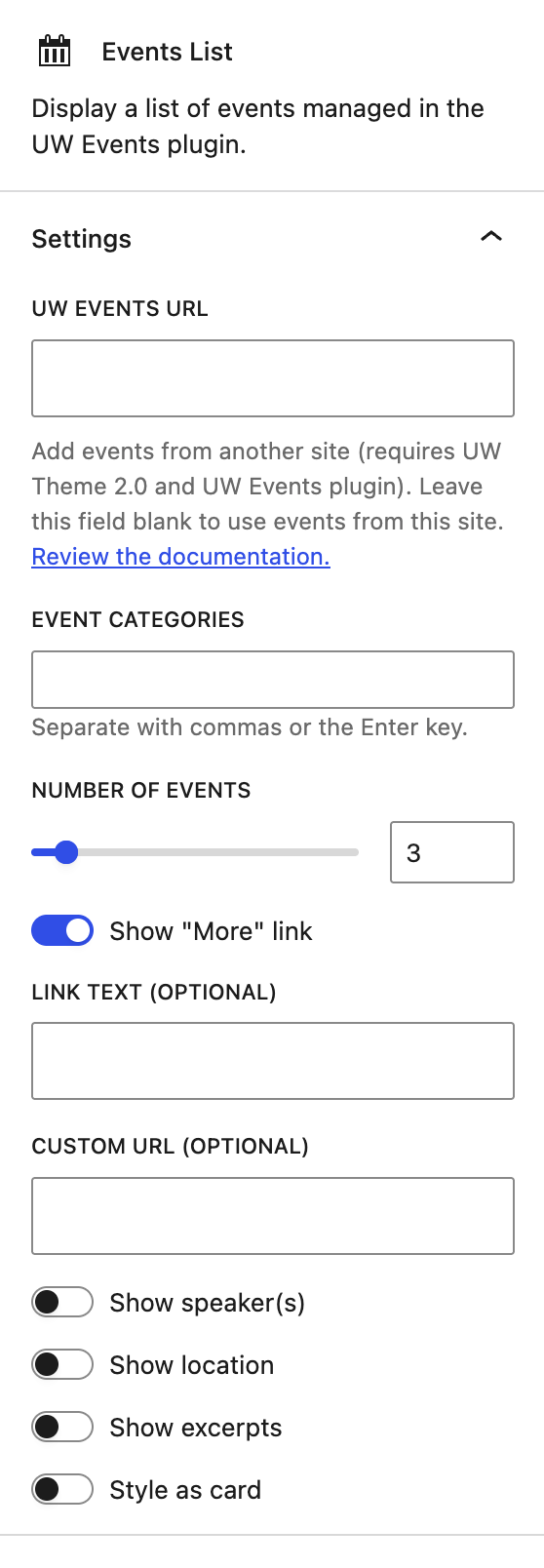
Block settings
UW Events URL
You can list events from another UW Theme 2.0 site that is using the UW Events plugin. You simply need to enter the full domain of the site (e.g. https://uwtheme.brand.wisc.edu).
This feature requires the other WordPress site to be using UW Theme 2.0 and the UW Events plugin.
Events Categories
You can customize the type of events that will be displayed based on taxonomies of your choosing. This allows you to display a curated list of events from a particular category or topic area.
Number of Events
The number of events displayed can be increased or decreased.
Content options
Choose from the 5 additional content options to add to your events list.
Show “More” link
The “More” link refers to where users can go to view the larger list of events. This can be customized by entering the link text and a custom URL
Show options
You can display the event’s speaker(s), location, and excerpt as part of the events.
Style as card
The display of events can be changed to a card style (example above), highlighting the featured image and excerpt using a different design.
Recommendations

When to consider something else
If an event would benefit from campus-wide visibility, post it to today.wisc.edu instead and use the today.wisc.edu block to list events on your site. We recommend this approach for most UW sites.

Usability and accessibility
- Add a heading for your events list using the Heading block and choose the correct heading level for accessibility.
- Use plain-language titles, avoid “click here,” and make sure linked registration pages are descriptive.
- Only display excerpts under 200 characters for easier scanning.

Design
In a narrower column layout, use the list view and remove the excerpt to keep content easily scannable.